
Internal Linking for Service Websites
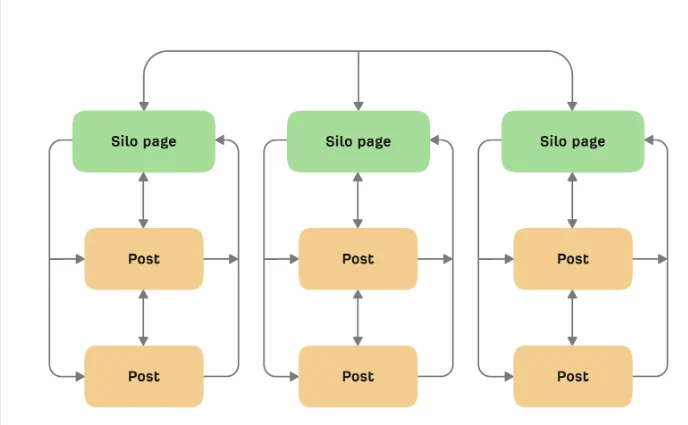
Internal linking for service websites should help a visitor understand what the company offers, find supporting evidence, and take the next useful step. The same links also help search systems discover pages and interpret relationships, but a crawlable link is valuable only when the destination improves the journey.
This guide shows how to organize service, industry, location, portfolio, and educational pages into a deliberate network. Begin with the services overview and a free website audit when you need to map the current structure.
Start with page purpose, not anchor text
Assign each important page one primary role. A service page explains an offer, a location page explains where it is delivered, a case study provides evidence, and an article answers a supporting question. When roles are clear, link decisions become easier and duplicate pages are easier to spot.
List the questions a visitor asks before and after reading each page. Link to the page that best answers the next question. Avoid adding a link merely because two pages share a keyword.
Create a shallow, understandable hierarchy
Important services should be reachable from stable navigation or a crawlable service hub. Supporting articles can link upward to the relevant service, while service pages can link to the most useful guides, proof, process, pricing factors, or FAQs.
A clear hierarchy does not require every page to be one click from the homepage. It requires logical paths without orphaned pages or long chains. Breadcrumbs can reinforce structure when they reflect the real hierarchy and remain consistent.
Use contextual links where decisions happen
Contextual links are most useful when the surrounding sentence explains why the destination matters. A paragraph about performance can direct readers to website performance guidance; a planning section can connect to what businesses should know about website development.
Place links after enough context has been provided. A wall of links at the start of a page makes users choose before they understand the topic. Repeated calls to the same URL rarely add value.
Write descriptive, natural anchors
Anchor text should preview the destination in ordinary language. “Review our web development services” is clearer than “click here,” while an exact-match phrase repeated across hundreds of pages can look mechanical and read poorly.
Vary wording naturally according to the sentence. Do not force city names, service phrases, or sales language into every anchor. Image links should have useful alternative text when the image itself performs the linking function.
Connect commercial and informational content
Articles should not exist as a separate library with no path to the business. Link a guide to the service that can help when the transition is relevant. Service pages can link back to educational content that answers detailed objections without overwhelming the core sales message.
For example, a technical article may lead to web development services, while a design guide can reference web design services. The destination should match the promise in the sentence.
Use proof and conversion links deliberately
Service pages often benefit from links to relevant portfolio work, process explanations, contact options, and measurement information. A portfolio link should point users toward comparable evidence rather than function as a generic footer item.
Calls to action can appear after meaningful decision points. Keep labels specific: request an audit, review a service, view related work, or contact the team. A vague button repeated after every paragraph creates noise.
Audit orphaned, broken, and redirected links
Crawl the site using the rendered, canonical URLs visitors can reach. Identify pages with no internal links, destinations returning errors, redirect chains, mixed protocol or host versions, and links to outdated slugs. Confirm that menus and scripted components still expose real links in the HTML.
Fix the source link to point directly to the final destination when practical. Redirects are useful during migrations, but they should not become the permanent internal-linking strategy.
Prevent cannibalization through consolidation
When several pages target the same intent, more links do not solve the duplication. Decide which page should be primary, merge genuinely overlapping material where appropriate, and update internal links to support the chosen destination. Keep separate pages when their audiences or tasks are meaningfully different.
Use the comparison in on-page versus off-page SEO to keep internal architecture distinct from external authority-building work.
Measure usefulness
Review crawl depth, orphan pages, clicks on key links, assisted journeys, form completion, and whether visitors reach the right service from supporting content. Pageviews alone do not prove that a link helped. Segment by device because crowded mobile layouts can hide or misplace useful navigation.
What does an internal-linking project cost?
Cost depends on site size, platform, content quality, crawl access, template complexity, migration history, and the amount of editorial judgment required. A small service site may need a focused audit and manual updates; a large site may require inventories, rules, engineering, and ongoing governance.
Ask for deliverables such as a page map, orphan report, recommended links, redirect cleanup, template changes, and verification. Avoid estimates based only on the number of links, because the value lies in choosing and validating the right relationships.
Internal-linking checklist
Define the purpose of each important page.
Maintain crawlable service and content hubs.
Link to the next useful answer in context.
Use descriptive anchors without forced repetition.
Connect guides, services, locations, and proof.
Remove broken links and unnecessary redirect hops.
Find orphaned pages after every major release.
Measure journeys and conversions, not link counts alone.
Frequently asked questions
How many internal links should a page have?
There is no universal number. Include links that help users or clarify structure, and avoid arbitrary quotas. A long reference guide may need more links than a focused landing page.
Do navigation links count as internal links?
Yes. Search systems can use navigation links, though contextual links provide additional meaning because of their surrounding content.
Should every article link to a service?
No. Link when the service is a logical next step. Forcing a commercial link into an unrelated answer reduces trust and does not improve the journey.
Are exact-match anchors harmful?
A clear descriptive phrase is fine when it fits naturally. The problem is mechanical repetition or stuffing designed around keywords instead of readers.
Can JavaScript links be used?
Use ordinary crawlable anchor elements with valid destination URLs for important navigation. Script-only interactions can be harder for users, assistive technology, and crawlers to interpret.
How often should links be audited?
Audit after redesigns, migrations, large publishing projects, URL changes, or service restructuring, and on a recurring schedule appropriate to site activity.
Conclusion
Strong internal linking is information architecture expressed through useful choices. Give pages distinct roles, connect them at relevant moments, maintain direct working URLs, and measure whether visitors reach better answers and business actions.
A website with many related services shows why clear links between service pages matter. On Dubai Glass Partition, part of our group, the shower glass partition installation page sits alongside office partition, mirror and pool fencing pages that users and crawlers need to move between.
Comments
Comments appear after admin approval.