
Accessible Forms That Generate More Leads
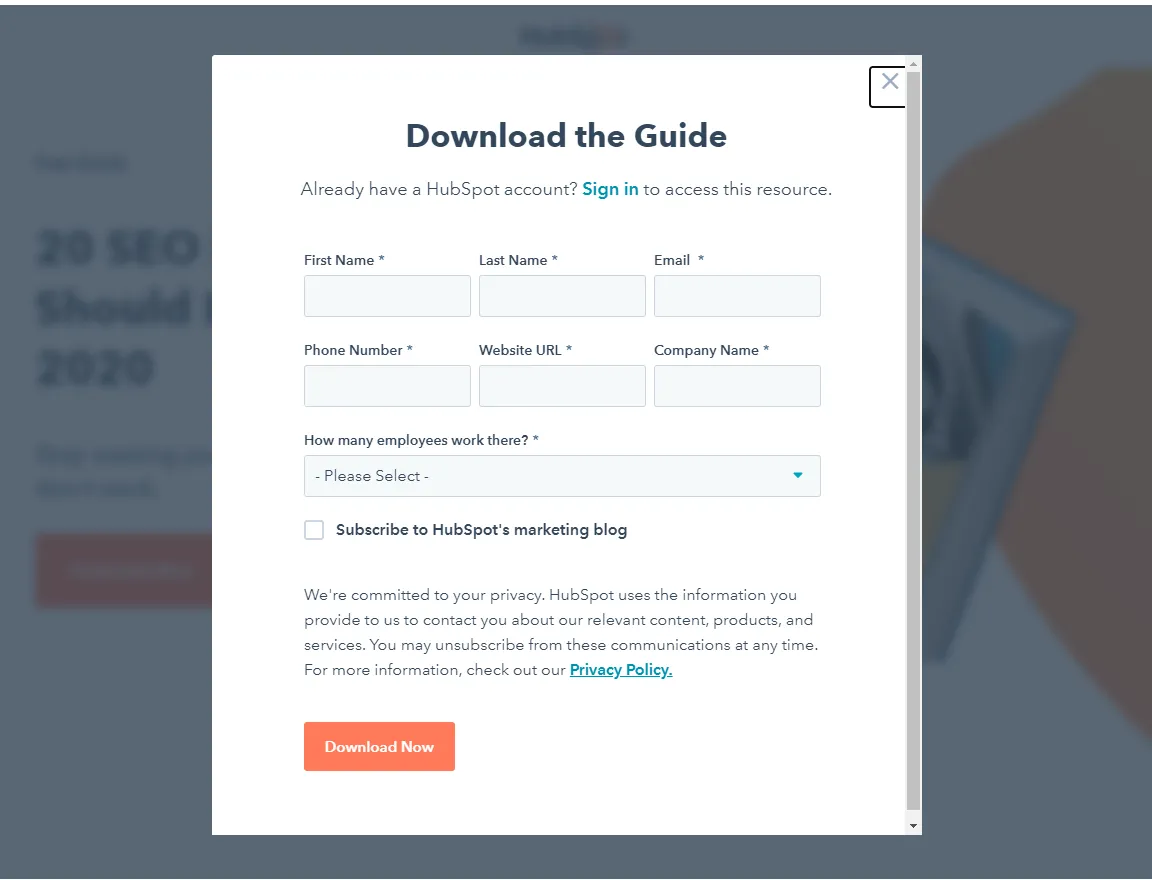
Accessible lead generation forms help more people understand what is requested, enter information accurately, recover from errors, and confirm that the submission worked. Those improvements reduce friction for everyone; accessibility and conversion quality often support the same goal.
Use this guide alongside accessibility in web development, web design services, and analytics and reporting.
Ask only for necessary information
Every field adds effort and potential privacy impact. Identify what the team needs to respond or qualify the enquiry at this stage. Collect additional details later when the relationship and purpose are clearer.
Mark required fields consistently and explain optional fields. Avoid requesting sensitive information through a general marketing form.
Use visible persistent labels
Place a clear text label with each control. Placeholder text can show an example but should not be the only label because it disappears during entry and may be difficult to perceive. Associate labels programmatically with inputs.
Instructions should name the expected format without relying on color. For example, show a phone or date pattern when the system truly requires one.
Group related controls
Use meaningful groups for choices such as preferred contact method or project type. Explain the question before the options and keep ordering logical. A screen-reader or keyboard user should understand the group without visual proximity alone.
Support keyboard and touch
All fields, choices, help, and submit controls should be reachable in a logical keyboard order with a visible focus indicator. Touch targets need enough space to reduce accidental activation. Do not create custom controls when native accessible elements meet the need.
Make errors specific and recoverable
Identify the field, explain what went wrong, and state how to fix it. Preserve valid entries after an error. Move focus or provide an error summary when appropriate so users do not have to search the page.
Do not report only “invalid input.” If a server error occurs, explain that the submission was not completed and provide a safe retry or alternative contact path.
Use validation at the right time
Helpful inline validation can prevent mistakes, but errors shown before a person finishes typing can be distracting. Validate on meaningful transitions and again on submission. Server-side validation remains necessary even when the browser performs checks.
Design an honest confirmation
After success, show what was received, what happens next, and a realistic response process without unsupported promises. Prevent duplicate submissions and send confirmation messages only when appropriate consent and delivery controls exist.
Explain privacy and consent
Place concise purpose information near the form and link to the applicable policy. Separate required processing from optional marketing consent. Do not use preselected consent where it is not permitted, and obtain qualified advice for relevant law.
Protect without creating barriers
Use spam protection that considers accessibility, privacy, and false positives. Rate limits, server validation, honeypots, and risk-based controls may reduce dependence on difficult visual challenges. Always provide a path for legitimate users who are blocked.
Connect the form to the service journey
Set expectations before the form by explaining the relevant service, process, and fit. Offer evidence through the portfolio and a specific alternative such as the free website audit.
Test with people and technology
Test mobile zoom, keyboard-only use, common screen readers, voice input, autofill, password managers where relevant, slow connections, and error states. Automated tests catch some issues; manual and user testing find workflow problems.
Measure without harming privacy
Track form views, starts, field errors in aggregate where appropriate, successful submissions, delivery failures, and qualified outcomes. Never send field values containing personal information into analytics. Confirm that one submission produces one conversion event.
What does accessible form work cost?
Cost depends on number of forms, custom controls, validation, integrations, languages, compliance review, testing, and remediation depth. A simple contact form differs from a multi-step application connected to a CRM.
Include design, implementation, assistive-technology testing, analytics, documentation, and regression checks in the scope.
Accessible form checklist
Remove unnecessary fields.
Provide visible associated labels.
Mark required and optional inputs clearly.
Group controls and instructions logically.
Support keyboard, touch, zoom, and autofill.
Write specific recoverable errors.
Confirm success and next steps.
Test delivery and privacy-safe tracking.
Frequently asked questions
Do placeholders count as labels?
No. Use persistent visible labels; placeholders may provide optional examples.
Should required fields use an asterisk?
They can, but explain the symbol and also provide programmatic required information.
Are multi-step forms accessible?
They can be when progress, headings, focus, validation, and back navigation are implemented clearly.
Does accessibility reduce conversion?
Accessible clarity usually removes friction. Any design change should still be tested with qualified outcomes.
Can CAPTCHA block users?
Yes. Choose layered protections and provide accessible alternatives or recovery paths.
What should be tested after a CRM change?
Submission, validation, duplicate prevention, routing, confirmation, consent, event tracking, and failure handling.
Conclusion
Accessible forms generate better opportunities by making the task understandable and recoverable. Ask less, label clearly, handle errors respectfully, protect data, and verify the complete journey from page to CRM.
Quote and enquiry forms on trade websites, such as the shower glass installer Shower Glass DXB, benefit from the same basics: visible labels, clear error messages and a phone or WhatsApp alternative.
Comments
Comments appear after admin approval.